Selecting, turning and pressing
Every list on every screen works the same way:
- Tappping on the screen selects a row, and does nothing else;
- turning the knob (the panel’s knob, the mouse wheel, or the arrow keys) steps the selection up and down the list, so that rows off the screen can be reached;
- Pressing on the knob acts on the selected row: the panel’s knob pressed in, the middle mouse button, Enter, or a second tap on the same row.
A press on a choice (such as AGC) moves it to its next value. A press on a number (such as WPM) starts changing it: the row is edged in green, turning changes the value, and another press or a tap ends it. A press on a text (such as MYCALLSIGN) opens the keyboard.
A row that opens another screen, a keyboard or a question ends in an arrow, ›. A row without one changes where it is.
On the front panel, the knob takes two notches to move one step in every list and setting, so that pressing it, which can turn it a notch by accident, does not move what you selected. Tuning the frequency is the exception: there every notch is a step.
The keyboard
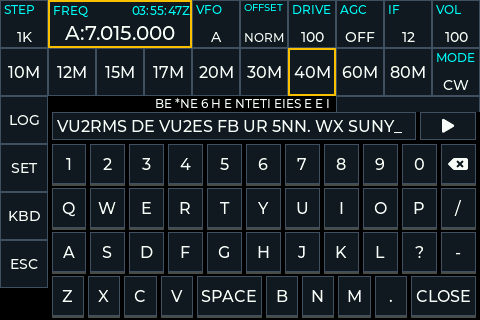
Wherever something is typed, the logbook, a callsign, or CW from KBD, the same keyboard comes up: the digits with the rub-out key after 0, the letters with SPACE in the bottom row, a few marks such as / ? - and ., and CLOSE, which ends the typing. Only typing a WiFi network’s key brings a full keyboard, with small letters, capitals and signs.
sBitx Users!
- the smaller knob on the top-right changes the selected control on the main screen directly and its press moves to the next control. In lists (like the logbook) it steps through the rows and its press acts.
- The larger knob on the bottom-left always tunes.
Anything that restarts the radio or takes it off line asks first, in a box.